

Assessments Agent
Use the CoreStack Assessments Agent to query compliance assessment results, track policy violations, and monitor workload compliance across your cloud environment.
Feature Overview
The Assessments Agent is an AI agent within CoreStack's Assessments module that delivers intelligent, agent-generated analysis of your compliance assessment results — covering assessment runs, policy violations, frameworks, and affected resources across your cloud environment. It is most relevant for compliance and cloud governance teams who need a fast, decision-ready view of assessment coverage and violations without manually assembling data from multiple reports.
This agent is most valuable to Assessment Reader, Assessment Member, and Assessment Admin users who need to review assessment results, trace policy violations to specific resources, and track compliance trends over time. It is not an assessment engine itself — it is scoped specifically to interpreting assessment runs and results that already exist in CoreStack.
Note: The Assessments Agent is currently in Beta, listed under AI Agents in the left navigation panel, alongside the Graphion Agent and Rate Optimization Agent. Contact your CoreStack administrator if AI Agents is not visible in your left navigation panel. It requires at least one completed assessment run in your tenant.
How It Works
The Assessments Agent interprets your request and generates a ready-to-read answer without requiring you to configure filters or build queries. When you invoke the agent, it fetches your assessment run data — including policy violations, resource details, coverage percentages, and best-practices framework versions — and renders a response against sensible defaults: the currently selected tenant and its most recent assessment runs.
The agent has built-in knowledge across:
-
Assessment frameworks and policies (for example, AWS Well-Architected Framework, Azure Well-Architected Framework) and their current best-practices versions
-
Resource-level violation detail by pillar, region, and policy
-
Assessment run history, so it can compare a current assessment's results against a previous run
-
Workload-scoped queries, so answers can be narrowed to a specific workload's tags, versions, or resource summary
Note: The Assessments Agent includes contextual memory: it automatically detects when a question refers to a prior result in the same chat, asks a lightweight clarifying question when your request is ambiguous, and retrieves detailed execution context only when relevant — so a follow-up question doesn't require you to restate context each time.
Prerequisites
Before you begin, ensure the following:
-
Role: An Assessment role that grants access to Assessments features is required in CoreStack.
-
Prior setup: At least one completed assessment run is available in CoreStack for the selected tenant.
-
Access: You can access `AI Agents > Assessments Agent` from the left navigation panel in CoreStack.
Accessing the Assessments Agent
In the left navigation panel, go to AI Agents > Assessments Agent to open the agent. The landing screen displays the AI Assessment assistant with a query field and a set of default prompts for the currently selected tenant.
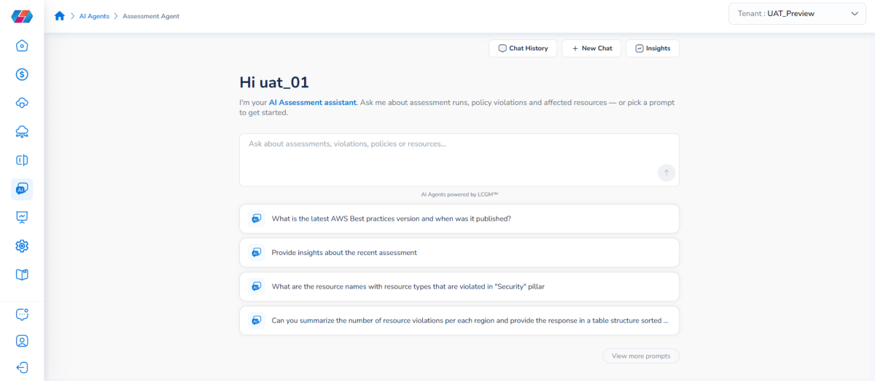
Click Insights at the top of the page to open the Assessments Overview panel, which presents two dashboards — Assessments Dashboard and Workload Dashboard — each designed to answer a distinct question about your compliance posture.
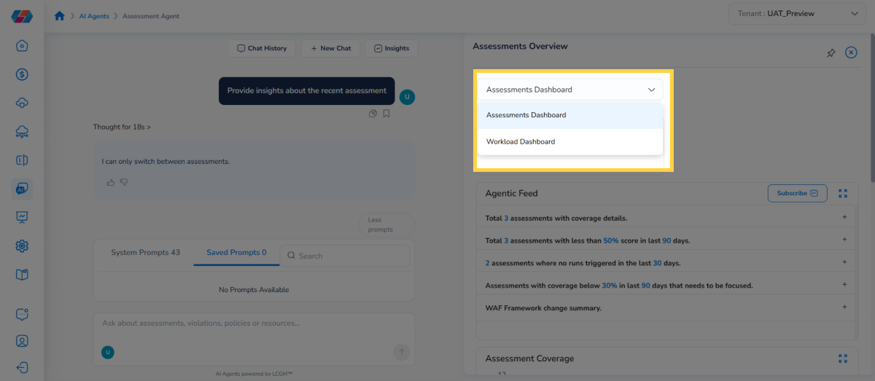
Assessments Dashboard
The Assessments Dashboard answers: "How compliant are my assessed resources right now?" It gives you a single-screen view of assessment coverage, violations, and an Agentic Feed of ranked findings. For a full walkthrough, see the Assessments Dashboard user guide
Workload Dashboard
The Workload Dashboard answers: "Which workloads have been assessed, and what's their status?" It surfaces a total workload count and a searchable, downloadable table of workload-level assessment detail. For a full walkthrough, see the Workload Dashboard user guide.
Tip: Use the Assessments Dashboard to check overall compliance health, then use the Workload Dashboard to see assessment status per workload. The dashboards are designed to be used together.
What You Can Ask the Agent
The Assessments Agent is built to answer questions across the following areas:
| Area | What It Covers | Example Prompts |
|---|---|---|
| Compliance & framework knowledge | Best-practices versions, deprecated SKUs, and policy details for a pillar | "What is the latest AWS Best practices version and when was it published?" "List all AWS best practices in the Cost Optimization pillar. Details: Include all…" "List all AWS EC2 instance SKUs deprecated in the last 3 months." |
| Assessment insights & summaries | Point-in-time summaries and run-over-run comparison | "Provide insights about the recent assessment" "Provide a summary of the most recent assessment. Details: Include overall s…" "Compare the current assessment output and previous one. Output: Detail the specific questions and Best practice…" |
| Resource violations by pillar, region & policy | Naming the specific resources and policies behind a violation count | "What are the resource names with resource types that are violated in "Security" pillar" "Can you summarize the number of resource violations per each region and provide the response in a table structure sorted …" "List all the Recommendations for the policies that has violated resource under Resource Type S3" |
| Workload-scoped queries | Narrowing any of the above to one named workload | "Provide all the assessment run for this workload" "Audience: Cloud Practice Head Task: Provide all the tags used for the resources in the workload `{Workload Name}`…" "Audience: Cloud Practice Head Task: Provide all version details of the workload '{Workload Name}'. " "Audience: Cloud Practice Head Task: Provide resource summary of the workload '{Workload Name}'." |
Note: Many of the agent's System Prompts (39 at last count) are structured as Audience / Task / Details — for example, one addressed to a Cloud Practice Head and another to a Cloud Infrastructure Engineer. Use the Search field in the prompt list to find one written for your role.
Frequently Asked Questions
Q: Where do I find the Assessments Agent in CoreStack?
In the left navigation panel, go to AI Agents > Assessments Agent. The Assessments Agent is listed alongside the Graphion Agent and Rate Optimization Agent.
Q: What's the difference between the Assessments Dashboard and the Workload Dashboard?
The Assessments Dashboard focuses on overall compliance health — total assessments, coverage, violations, and an Agentic Feed of ranked findings. The Workload Dashboard focuses on individual workloads — how many exist and their assessment status in a searchable table. Both dashboards are complementary; most compliance workflows benefit from using both.
Q: Do I need to configure anything before using the agent?
No. The agent answers using sensible defaults — the currently selected tenant and its most recent assessment runs — with no setup required. Open the agent, type or select a prompt, and the answer renders immediately.
Q: Does the agent remember context from my previous questions?
Yes. The Assessments Agent includes contextual memory: it detects when a follow-up question refers to a prior result, asks for clarification if your question is ambiguous, and retrieves detailed execution context only when relevant — so you don't need to restate context in a follow-up question within the same chat.
Q: Can the agent compare my current assessment against a previous one?
Yes. Ask a question such as "Compare the current assessment output and previous one," and specify what to detail — for example, specific questions and best-practice results — in your prompt.
Q: What's the difference between the Assessments Agent and the Graphion Agent?
The Assessments Agent answers questions about compliance — whether your resources violate assigned policies or frameworks such as CIS, NIST, or the AWS/Azure Well-Architected Frameworks. The Graphion Agent answers questions about application vulnerabilities — risk scores, SBOMs, and builds for your portfolios, applications, and projects. They draw on different data and don't currently share results with each other.
Troubleshooting
The agent says it has no data for a recent assessment
Cause: No assessment run has completed yet for the selected tenant, or the wrong tenant is selected.
Solution:
- Check the Tenant switcher in the top-right corner and confirm the correct tenant is selected.
- Confirm at least one assessment has completed by asking "Provide insights about the recent assessment."
- If no assessment has run yet, trigger or wait for one to complete before asking again.
If the issue persists, contact CoreStack support with your tenant name and the assessment you expected to see.
A resource-violation query returns no results for a pillar or region
Cause: No violations exist in that scope, or the pillar or region name in your question doesn't match CoreStack's naming exactly.
Solution:
- Re-check the exact pillar name (for example, "Security", "Cost Optimization") against the assessment's own framework.
- Try the same question without the pillar or region filter to confirm the assessment has any violations at all.
- If violations exist but the filtered query still returns nothing, rephrase the region or pillar name and ask again.
If the issue persists, contact CoreStack support with your tenant name, the assessment name, and the exact question asked.
A workload-scoped prompt doesn't return results
Cause: The Workload Name in your question doesn't exactly match a workload name in CoreStack.
Solution:
- Open the Workload Dashboard to confirm the exact workload name.
- Re-ask the prompt with the exact workload name substituted for the `{Workload Name}` placeholder.
- Confirm the workload has at least one completed assessment run.
If the issue persists, contact CoreStack support with your tenant name and the workload name you queried.
Updated about 1 month ago