

Graphion Agent
Use the CoreStack Graphion Agent to analyze application vulnerabilities, trace SBOM and supply chain risk, and assess build and portfolio security posture across your applications and projects.
Feature Overview
The Graphion Agent is an AI agent within CoreStack's Graphion capability that delivers intelligent, agent-generated analysis of your application security posture — covering vulnerabilities, risk scores, SBOMs, and builds across your portfolios, applications, and projects. It is most relevant for Security teams managing active application portfolios who need a fast, decision-ready view of vulnerability exposure and build risk without manually assembling data from multiple scans and reports.
This agent is most valuable to Graphion Reader, Graphion Developer, Graphion Application Admin, and Graphion Portfolio Admin users who need to assess vulnerability exposure, trace supply chain risk, and prioritize remediation. It is not a vulnerability scanner or SBOM generator — it is scoped specifically to interpreting scan and build data that already exists in CoreStack.
Note: The Graphion Agent is currently in Beta, listed under AI Agents in the left navigation panel, alongside the Assessments Agent and Rate Optimization Agent. Contact your CoreStack administrator if AI Agents is not visible in your left navigation panel. It requires at least one portfolio, application, or project onboarded to Graphion with SBOM and vulnerability scan data.
How It Works
The Graphion Agent interprets your request and generates a ready-to-read answer or dashboard view without requiring you to configure filters or build queries. When you invoke the agent, it fetches your portfolio, application, project, SBOM, and vulnerability data — including risk scores, prevalence, Known Exploited Vulnerabilities (KEVs), and build history — and renders a response against sensible defaults: the currently selected tenant and its most recently scanned builds.
The agent has built-in knowledge across:
-
Vulnerability risk scoring (Graphion Risk Score) and prevalence ranking across applications, portfolios, and the tenant as a whole
-
SBOM composition and CVE-to-resource tracing for supply chain vulnerabilities
-
The Portfolio → Application → Project hierarchy, so answers are scoped to the entity you meant
-
Build history, so it can compare a project's current build against prior builds for newly introduced risk
Note: Because insights reflect your tenant's most recently scanned builds, the data lags behind live scanning activity by however long the last build or scan took to process — it is not a real-time view of your infrastructure.
Prerequisites
Before you begin, ensure the following:
-
Role: A Graphion role that grants access to Graphion is required in CoreStack.
-
Applications and projects: At least one portfolio, application, and project is onboarded to Graphion, with SBOM data and a completed vulnerability scan for at least one build.
-
Access: You can access
AI Agents > Graphion Agentfrom the left navigation panel in CoreStack, or click Graphion Agent from any sub-menu within the Graphion module.
Accessing the Graphion Agent
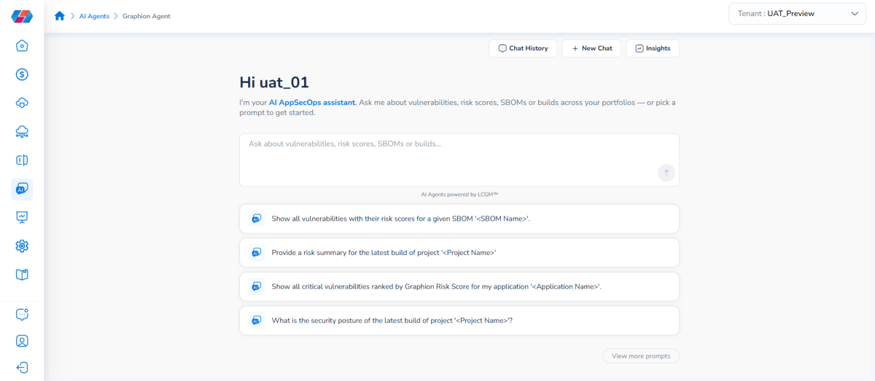
In the left navigation panel, go to AI Agents > Graphion Agent to open the agent. The landing screen displays the AI Graphion assistant with a query field and a set of default prompts for the currently selected tenant.
Reading the Graphion Overview
The Graphion Overview is organized into two reading zones.
Zone 1 — Portfolio Summary
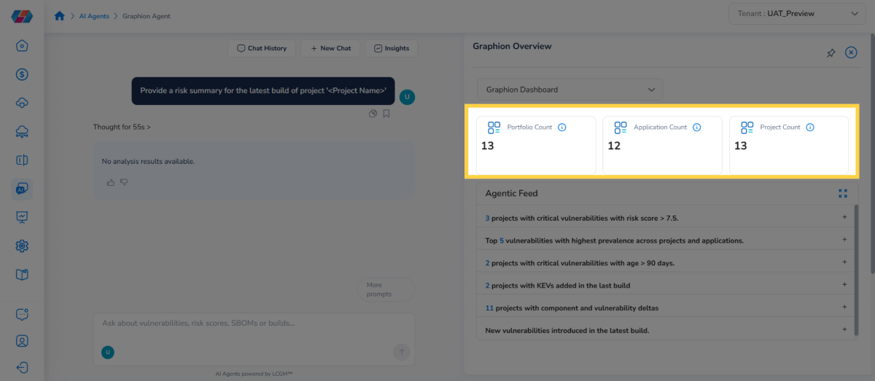
The top of the panel provides an at-a-glance read of how much Graphion is currently tracking for the selected tenant.
- Summary count cards: displays Portfolio Count, Application Count, and Project Count — a quick check of scope before you dig into findings.
Zone 2 — Agentic Feed
The primary reading surface of the panel, translating scan and build data into ranked findings.
-
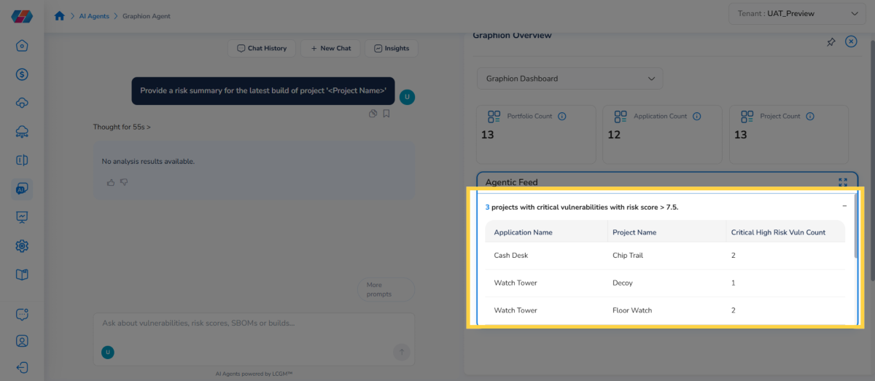
Agentic Feed: lists ranked findings drawn from your most recent scans and builds. A tenant's feed typically includes entries such as projects with critical vulnerabilities with risk score > 7.5, top vulnerabilities with the highest prevalence across projects and applications, projects with critical vulnerabilities with age > 90 days, projects with Known Exploited Vulnerabilities (KEVs) added in the last build, projects with component and vulnerability deltas, and new vulnerabilities introduced in the latest build.
-
Expanded finding detail: click a feed item to expand it into a table listing the affected applications, projects, and vulnerability counts behind that finding.
Note: Both the Agentic Feed and the chat draw from the same underlying scan and build data — a finding you see in the feed can also be asked about directly in the chat, and vice versa.
What You Can Ask the Agent
The Graphion Agent is built to answer questions across the following areas:
| Area | What It Covers | Example Prompts |
|---|---|---|
| Vulnerability & risk scoring | Ranking vulnerabilities by Graphion Risk Score at the application, portfolio, or tenant level; narrowing by keyword or prevalence | "Show all critical vulnerabilities ranked by Graphion Risk Score for my application '<Application Name>'." "Show the top 10 vulnerabilities by prevalence, across the application '<Application Name>'." "Show the top 5 critical vulnerabilities that include a keyword '<keyword name>' in the description." |
| Build & project security posture | Point-in-time risk summaries and security posture for a project's latest build | "Provide a risk summary for the latest build of project '<Project Name>'." "What is the security posture of the latest build of project '<Project Name>'?" |
| Portfolio, application & project relationships | Navigating the Portfolio → Application → Project hierarchy conversationally | "Show all applications that are related to the portfolio '<Portfolio Name>'." "Show all projects within the application '<Application Name>'." "Which applications have the most vulnerabilities?" |
| Threat & resource impact | Working backward from a threat type or a specific resource instead of an application or project | "How many resources are affected due to '<type of threat>' threat?" "Show me all resources affected due to threats (prioritized by severity)." "How many vulnerabilities impact my resource '<resource>'?" |
| Supply chain & SBOM tracing | Tracing a known CVE or SBOM component to the resources it actually touches | "Show all vulnerabilities with their risk scores for a given SBOM '<SBOM Name>'." "Where is this supply chain vulnerability '<CVE X>' located in the infrastructure?" "How many resources are affected due to this supply chain vulnerability '<CVE X>'." |
Frequently Asked Questions
Q: Where do I find the Graphion Agent in CoreStack?
In the left navigation panel, go to AI Agents > Graphion Agent. The Graphion Agent is listed alongside the Assessments Agent and Rate Optimization Agent, and is also reachable from any sub-menu within the Graphion module.
Q: Do I need to configure anything before using the agent?
No. The agent answers using sensible defaults — the currently selected tenant and its most recently scanned builds — with no setup required. Open the agent, type or select a prompt, and the answer renders immediately.
Q: What's the difference between the Graphion Agent and the Assessments Agent?
The Assessments Agent answers questions about compliance — whether your resources violate assigned policies or frameworks such as CIS or NIST. The Graphion Agent answers questions about application vulnerabilities — risk scores, SBOMs, and builds for your portfolios, applications, and projects. They draw on different data and don't currently share results with each other.
Q: Does the Graphion Agent run a new vulnerability scan when I ask it a question?
No. The agent only answers from vulnerability scans and builds that have already completed — it does not trigger new scans. If your question is about a build that hasn't been scanned yet, run or wait for that scan before asking.
Q: Is the data in the Graphion Overview panel live?
No. It reflects your tenant's most recently completed scans and builds, not real-time infrastructure state. If a recent change isn't showing up, confirm whether a new scan has run since that change.
Troubleshooting
The Agentic Feed shows no findings for my tenant
Cause: No vulnerability scans or builds have completed yet for any onboarded application or project, or none of the completed scans matched the feed's finding criteria.
Solution:
- Confirm at least one project has a completed build and vulnerability scan by asking the agent "Provide a risk summary for the latest build of project '<Project Name>'."
- If the agent has no data for that project, trigger or wait for a scan to complete in the Graphion module.
- Refresh the Graphion Overview panel after the scan completes.
If the issue persists, contact CoreStack support with your tenant name and the project or application you expected to see findings for.
Portfolio, Application, or Project counts show 0
Cause: Nothing has been onboarded to Graphion for the selected tenant yet, or the wrong tenant is selected.
Solution:
- Check the Tenant switcher in the top-right corner and confirm the correct tenant is selected.
- If the tenant is correct, onboard at least one portfolio, application, and project in the Graphion module before expecting the agent or Overview panel to return results.
If the issue persists, contact CoreStack support with your tenant name and the portfolio, application, or project you expected to see.
The agent can't find the SBOM or CVE I referenced
Cause: The SBOM name or CVE ID was entered with a typo, doesn't exist in this tenant, or hasn't been ingested yet.
Solution:
- Double-check the exact SBOM Name or CVE ID against the source scan or build report.
- Confirm the SBOM was generated for a build in the tenant currently selected in the Tenant switcher.
- If the SBOM or CVE is recent, allow time for the scan data to finish processing, then ask again.
If the issue persists, contact CoreStack support with your tenant name, the SBOM name or CVE ID, and the project or application it belongs to.
Updated 13 days ago